
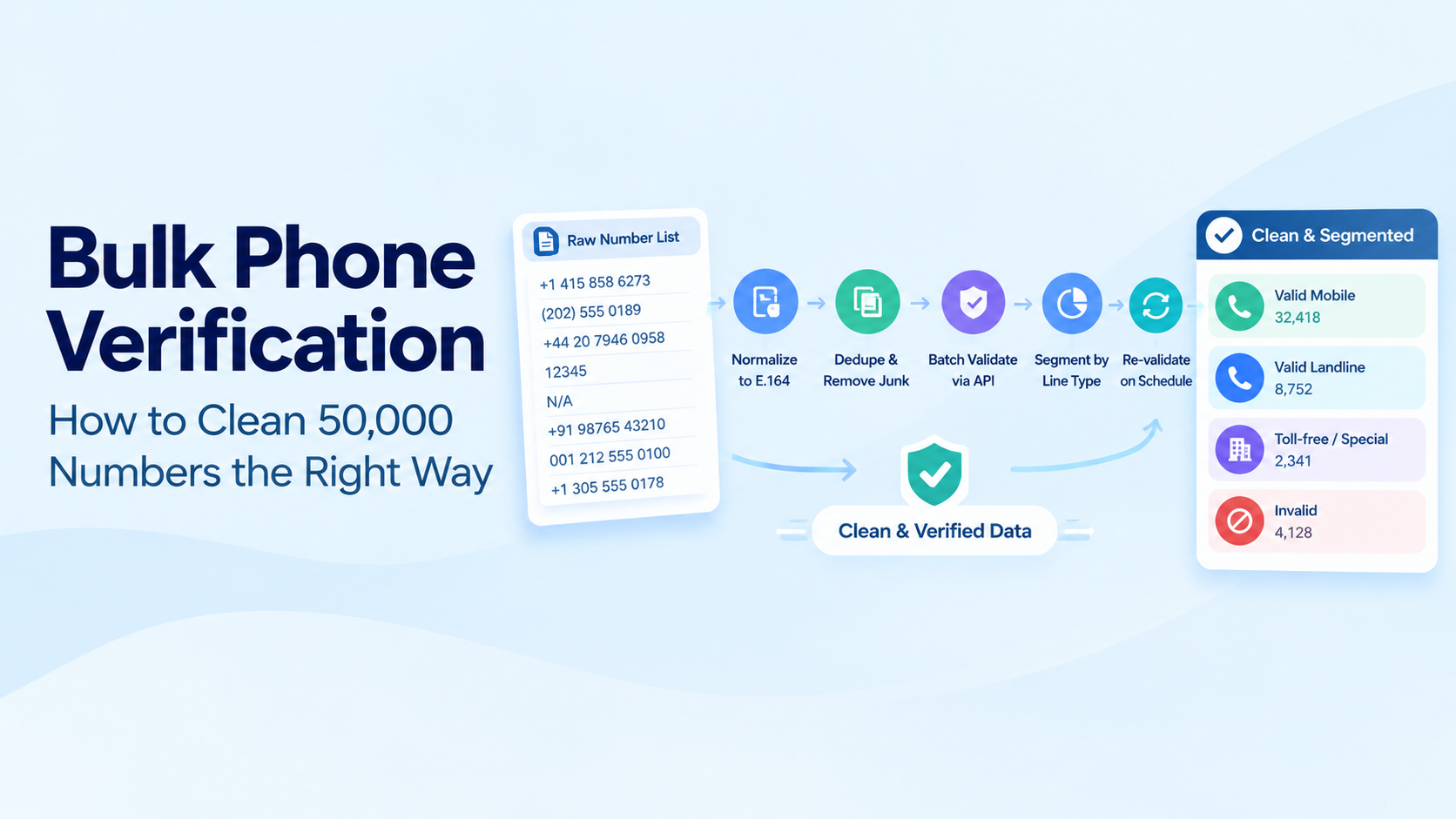
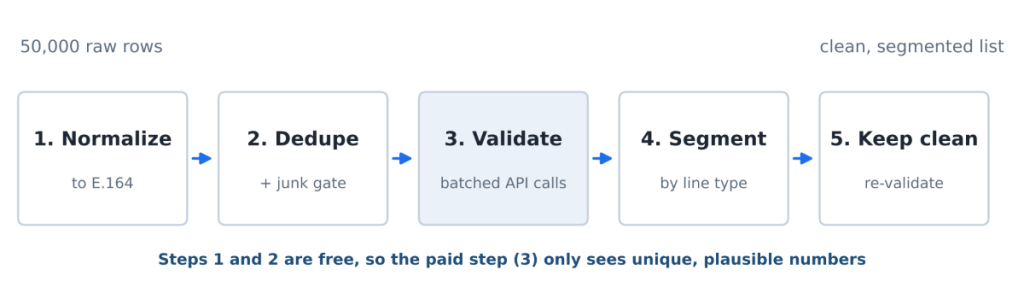
| A bulk phone number lookup cleans a large list in five steps: normalize every number to E.164, remove duplicates and obvious junk, validate the remaining numbers through an API in rate-limited batches, segment the results by validity and line type, and re-validate on a schedule. Order matters, because each step makes the next one cheaper. |
Table of Contents
Key Takeaways
- Normalize to E.164 before anything else. Duplicates hide behind formatting, and you pay for every duplicate you validate.
- A short regex and length gate removes obvious junk for free, but it cannot tell you a number is real. That job belongs to the API.
- The batch loop needs three things to survive 50,000 rows: limited concurrency, retries with exponential backoff, and incremental writes to disk.
- Segment results into valid mobile, landline, other line types and invalid, and give each bucket its own action instead of a single pass or fail.
- Lists decay continuously, so re-validate active segments on a schedule and before every large send.
Someone hands you a CSV export with 50,000 phone numbers from three years of signups, trade shows and a CRM migration. Some have country codes, some have dashes, some are “N/A”. Marketing wants to text all of them next week. This post walks through the pipeline we recommend for that job, with a complete Python script you can run against a bulk phone number verification workflow today.
What a dirty phone list actually costs
Bad numbers cost you in three ways:
- Wasted spend. Every SMS to an invalid number or a landline is billed by your provider and never read.
- Sender reputation. High failure rates on a campaign are a signal carriers and aggregators watch. Repeated sends to dead numbers make your legitimate traffic look worse.
- Wrong-person risk. Numbers get reassigned. A text meant for your old customer can reach a stranger who never gave consent, which in the US is a TCPA exposure.
That last one happens more often than people expect. The FCC estimated that about 35 million US numbers are disconnected and reassigned every year. A list that was accurate when it was collected drifts a little further every month it sits unused.
Step 1: Normalize everything to E.164 first
E.164 is the international format: a plus sign, the country code, then the national number, with no spaces or punctuation, for example +14158586273. If you are new to it, our guide to the E.164 format covers the rules.
Normalizing first does two things. It makes duplicates visible ((415) 858-6273 and +1 415 858 6273 are the same number), and it gives the API clean, unambiguous input. Numbers without a country code need a default region; use the country the list was collected in.
Google’s open-source libphonenumber (the phonenumbers package in Python) handles parsing for every country, so you never have to maintain formatting rules yourself.
Step 2: Dedupe and pre-filter the obvious junk
Before spending an API request, throw out anything that cannot possibly be a phone number. The script below does this in two cheap checks:
- A length gate. After stripping everything except digits and +, E.164 numbers have at most 15 digits. Anything under 7 or over 15 is out. That catches N/A, 12, and pasted order IDs.
- A possibility check. libphonenumber’s is_possible_number confirms the length makes sense for that country.
Then dedupe on the E.164 value. On real-world exports this step regularly removes a meaningful slice of the list before the API ever sees it.
Be honest with yourself about what this stage proves: nothing beyond “plausible shape”. A perfectly formatted number can still be unallocated, disconnected or a landline. Regex is a filter, not a verifier.
Step 3: Batch validation through the API
This is the centerpiece. The script below reads a CSV, normalizes and dedupes, then validates each unique number with a small thread pool. It handles the three things that break naive loops at this scale:
- Rate limits. WORKERS caps concurrent requests. Set it below your plan’s limit.
- Transient failures. Timeouts, 5xx responses, HTTP 429 and the API’s rate-limit error (code 106) are retried with exponential backoff: 1, 2, then 4 seconds.
- Crashes halfway through. Results are written in chunks of 500 and flushed to disk, so a failure at row 40,000 keeps the first 39,500 results.
The API key comes from an environment variable and the script runs on your machine or server, never in a browser.
Python (clean_list.py), requires: pip install requests phonenumbers
"""Bulk phone list cleaner: normalize -> dedupe -> validate -> write CSV.

Usage:
    export NUMVERIFY_KEY=your_key_here
    python clean_list.py raw_numbers.csv clean_numbers.csv US
"""
import csv
import os
import re
import sys
import time
from concurrent.futures import ThreadPoolExecutor

import phonenumbers
import requests

API_URL = os.environ.get("NUMVERIFY_URL", "http://apilayer.net/api/validate")
API_KEY = os.environ["NUMVERIFY_KEY"]          # never hardcode the key
WORKERS = 4                                    # parallel requests; keep under your plan's limit
CHUNK_SIZE = 500                               # rows processed before each CSV flush
MAX_RETRIES = 4
RETRYABLE_CODES = {106}                        # 106 = rate_limit_reached

session = requests.Session()


def to_e164(raw, default_region):
    """Return the number in E.164, or None if it cannot be parsed at all."""
    cleaned = re.sub(r"[^\d+]", "", raw or "")
    if not 7 <= len(cleaned.lstrip("+")) <= 15:        # cheap junk gate
        return None
    try:
        parsed = phonenumbers.parse(cleaned, default_region)
    except phonenumbers.NumberParseException:
        return None
    if not phonenumbers.is_possible_number(parsed):
        return None
    return phonenumbers.format_number(parsed, phonenumbers.PhoneNumberFormat.E164)


def validate(e164):
    """Call the API with retries and exponential backoff."""
    params = {"access_key": API_KEY, "number": e164.lstrip("+")}
    for attempt in range(MAX_RETRIES):
        try:
            resp = session.get(API_URL, params=params, timeout=10)
            if resp.status_code == 429 or resp.status_code >= 500:
                raise requests.HTTPError(f"HTTP {resp.status_code}")
            data = resp.json()
            error = data.get("error")
            if error and error.get("code") in RETRYABLE_CODES:
                raise requests.HTTPError(f"API error {error['code']}")
            if error:                                   # bad key, quota used up, etc.
                return {"number": e164, "status": "error", "error": error.get("type")}
            return {
                "number": e164,
                "status": "valid" if data.get("valid") else "invalid",
                "line_type": data.get("line_type") or "",
                "carrier": data.get("carrier") or "",
                "country_code": data.get("country_code") or "",
            }
        except (requests.RequestException, ValueError):
            if attempt == MAX_RETRIES - 1:
                return {"number": e164, "status": "error", "error": "retries_exhausted"}
            time.sleep(2 ** attempt)                    # 1s, 2s, 4s
    return {"number": e164, "status": "error", "error": "unknown"}


def main(src, dest, region):
    with open(src, newline="") as f:
        raw_numbers = [row[0] for row in csv.reader(f) if row]

    seen, queue, rejected = set(), [], 0
    for raw in raw_numbers:
        e164 = to_e164(raw, region)
        if e164 is None:
            rejected += 1
        elif e164 not in seen:
            seen.add(e164)
            queue.append(e164)

    print(f"{len(raw_numbers)} rows -> {len(queue)} unique, {rejected} rejected before the API")

    fields = ["number", "status", "line_type", "carrier", "country_code", "error"]
    with open(dest, "w", newline="") as out, ThreadPoolExecutor(WORKERS) as pool:
        writer = csv.DictWriter(out, fieldnames=fields, restval="")
        writer.writeheader()
        for start in range(0, len(queue), CHUNK_SIZE):
            chunk = queue[start:start + CHUNK_SIZE]
            writer.writerows(pool.map(validate, chunk))
            out.flush()                                 # progress survives a crash
            print(f"validated {min(start + CHUNK_SIZE, len(queue))}/{len(queue)}")


if __name__ == "__main__":
    main(sys.argv[1], sys.argv[2], sys.argv[3] if len(sys.argv) > 3 else "US")
Run it like this:
Shell
export NUMVERIFY_KEY=your_key_here
python clean_list.py raw_numbers.csv clean_numbers.csv US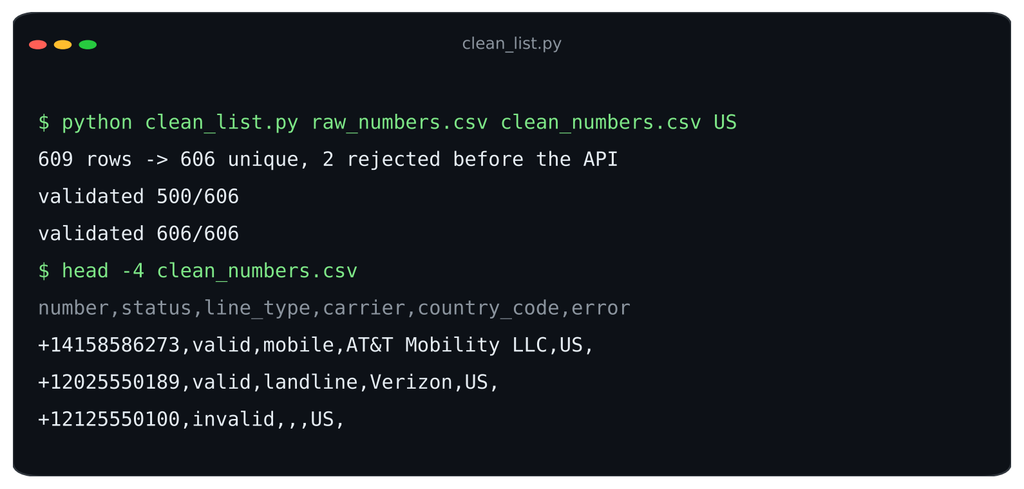
Each API call returns a JSON object like this one, and the script keeps the fields you need for segmenting:
JSON response
{
  "valid": true,
  "number": "14158586273",
  "local_format": "4158586273",
  "international_format": "+14158586273",
  "country_prefix": "+1",
  "country_code": "US",
  "country_name": "United States of America",
  "location": "Novato",
  "carrier": "AT&T Mobility LLC",
  "line_type": "mobile"
}
And the output CSV looks like this:
clean_numbers.csv
number,status,line_type,carrier,country_code,error
+14158586273,valid,mobile,AT&T Mobility LLC,US,
+12025550189,valid,landline,Verizon,US,
+442079460958,valid,landline,,GB,
+12125550100,invalid,,,US,
Two practical notes. First, check your plan’s monthly request quota before you start; 50,000 lookups need a plan sized for it, and the script records quota errors in the error column rather than retrying them forever. Second, the free plan endpoint uses plain HTTP, so run large jobs on a paid plan with HTTPS if your numbers are sensitive.
Step 4: Segment the results and decide
A single valid or invalid flag throws away most of what you paid for. Use line type to give each bucket its own action:
| Segment | What it means | What to do |
|---|---|---|
| Valid mobile | Real number on a mobile range | Send SMS. For high-value sends, run an HLR check first to confirm the number is live. |
| Valid landline | Real number on a fixed line | Remove from SMS. Keep it for calls and route OTPs to voice. |
| Toll-free, premium-rate, special services | Business or service numbers | Suppress from consumer messaging. |
| Invalid | Fails numbering plan checks | Suppress, and ask the contact for a new number the next time they log in. |
| Error | Lookup did not complete | Re-run just these rows. |
If you want the reasoning behind the mobile and landline split, see mobile or landline. For what an HLR check adds on top of validation, see HLR lookup explained.
Step 5: Keep it clean
Cleaning is a habit, not a one-off project. Three habits keep a list from sliding back:
- Validate at the point of entry. A server-side check on your signup form stops bad numbers from entering the list at all.
- Re-validate on a cadence. Active marketing segments every quarter is a reasonable default, and always before a large campaign to an older segment.
- Track a few numbers over time: percentage valid, percentage mobile, duplicate rate on import, and SMS delivery rate per campaign. If percentage valid drops between runs, something upstream (a form, an import, an integration) is letting junk in.
Spreadsheet plus API, or a data cleaning vendor?
For most teams, a script like the one above plus a spreadsheet is enough. A full data-cleaning vendor makes sense when phone numbers are one field among many you need to fix. Use these questions to decide:
- Volume and frequency. One 50,000-row cleanup a quarter is a script job. Millions of rows a day calls for a managed pipeline.
- Fields involved. Phone only? Use an API. Phones, emails, addresses and company names together? A vendor saves time.
- Coverage. Check the countries in your list are supported, and test with a sample of real numbers from each.
- Data returned. At minimum: validity, E.164 format, country, carrier and line type.
- Security. Server-side calls, HTTPS, and a clear data retention policy from the provider.
- Pricing model. Per-request pricing with predictable plan limits is easier to budget than opaque bundles.
- Integration. A plain REST endpoint that returns JSON works from any language, cron job or ETL tool you already use.
If a script fits your volume, the bulk phone number verification page covers plans and limits for running jobs like this one.
FAQs
How do I verify phone numbers in bulk?
Normalize the list to E.164, remove duplicates and obvious junk, then send each unique number to a phone validation API from a server-side script with limited concurrency and retries. Save validity, line type and carrier for each number, then segment the list on those fields.
How often should I re-validate a phone list?
Re-validate active marketing segments about once a quarter, and always before a large send to an older segment. Validate new numbers at the moment they are collected so the list stays clean between runs.
Can I validate numbers without texting them?
Yes. A validation API checks the number against numbering plan and carrier data and returns validity, carrier and line type without contacting the phone. An HLR lookup can also confirm a mobile number is live without sending a message.
What is phone data quality?
Phone data quality is how accurate, complete and usable the phone numbers in your systems are. It is usually measured by the share of numbers that are valid, correctly formatted, unique and reachable on the channel you plan to use.
| Run your first batch today. Create a free Numverify API key, test the script on a few hundred rows, then scale up with bulk phone number verification. |