
| libphonenumber is Google’s open-source library for parsing, formatting and validating phone numbers against each country’s numbering plan. It works offline and is excellent at turning messy input into valid E.164 numbers. It cannot tell you whether a number is in service, which carrier serves it after porting, or its line type where mobile and landline share ranges. |
Table of Contents
Key Takeaways
- libphonenumber validates numbers against published numbering plans, offline, for every country, and formats them to E.164.
- Its carrier mapper returns the carrier a number range was originally assigned to, not the current carrier; Google says so in its own documentation.
- A number can pass isValid() and still be disconnected, ported to a different carrier, or a VoIP line.
- In the US and Canada, mobile and landline numbers share ranges, so the library returns FIXED_LINE_OR_MOBILE rather than a definite type.
- The practical pattern: libphonenumber as a free gate, then a validation API for carrier and line type on the numbers that pass.
If you work with phone numbers in code, you will meet libphonenumber sooner or later. It is one of the best open-source libraries in its category, and this post starts by showing what it does well. Then it covers what the library cannot know, why, and how to fill the gap, including the question that brings many developers here: how to find a number’s carrier in JavaScript.
What libphonenumber actually is
libphonenumber is Google’s common Java, C++ and JavaScript library for parsing, formatting and validating international phone numbers. It powers phone handling in Android and many other products. It bundles metadata for every country’s numbering plan: valid lengths, prefixes, number types and formatting rules.
Community ports bring it to other languages. The most widely used:
| Language | Package | Notes |
|---|---|---|
| JavaScript | libphonenumber-js | Smaller rewrite with min, max and mobile metadata builds |
| PHP | giggsey/libphonenumber-for-php | Close port, includes geocoder and carrier mapper |
| Python | phonenumbers | Close port, includes geocoder, carrier and time zone data |
| Java, C++ | google/libphonenumber | The original |
Offline validation is the right call when you need speed, privacy or volume: normalizing a CRM export, formatting input as people type, or rejecting impossible numbers before you spend anything on an API.
Quick start with libphonenumber-js
Install it with npm install libphonenumber-js. The /max build includes the metadata needed for number types:
Node.js (quickstart.js)
// npm install libphonenumber-js
// The /max build includes number-type metadata (mobile, fixed line, VoIP...).
const { parsePhoneNumberFromString, AsYouType } = require("libphonenumber-js/max");

function inspect(input, defaultCountry = "US") {
  const phone = parsePhoneNumberFromString(input, defaultCountry);
  if (!phone) return { input, parsed: false };
  return {
    input,
    valid: phone.isValid(),          // matches the country's numbering plan
    e164: phone.number,              // e.g. +14155552671
    country: phone.country,          // ISO code, e.g. "US"
    type: phone.getType() ?? null,   // MOBILE, FIXED_LINE, FIXED_LINE_OR_MOBILE, VOIP...
    national: phone.formatNational(),
  };
}

for (const n of ["(415) 555-2671", "+44 7911 123456", "+44 20 7946 0958", "+1 212 000 0000", "hello"]) {
  console.log(JSON.stringify(inspect(n)));
}

// As-you-type formatting for input fields
console.log(new AsYouType("US").input("4155552671")); // (415) 555-2671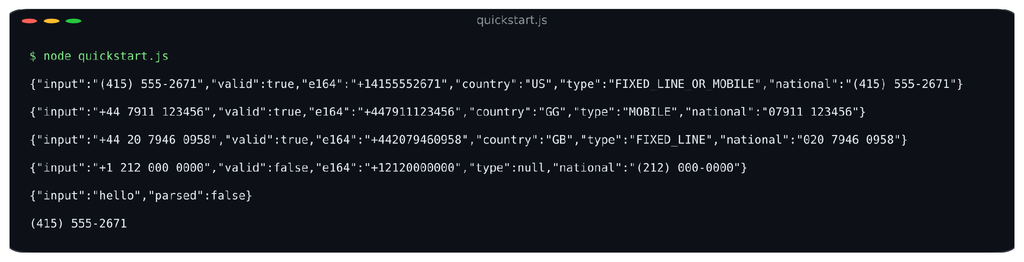
Output of quickstart.js with libphonenumber-js 1.13.
Two results are worth a closer look. +44 7911 123456 comes back as country GG, Guernsey, which shares the UK’s +44 code; the library knows that range belongs there. And +1 212 000 0000 is rejected because US exchange codes cannot start with 0, a rule no simple regex encodes.
What the library gets right
- Parsing anything. Brackets, dots, spaces, national prefixes, 00 international prefixes and pasted text all resolve to the same number.
- Real numbering-plan rules. Length and prefix rules per country and per number type, maintained by Google and updated as plans change.
- E.164 formatting. One call gives you the canonical format for storage, deduplication and SMS gateways.
- As-you-type formatting. AsYouType reformats input live, which makes phone fields much friendlier.
- Number type from the range. Mobile, fixed line, toll free, premium rate, VoIP and more, where a country’s plan separates them.
- Zero network calls. Fast, free and private. Nothing leaves your server or the user’s browser.
If you only need to know that input is a well-formed, plausible number for its country, libphonenumber may be all you need.
The three blind spots
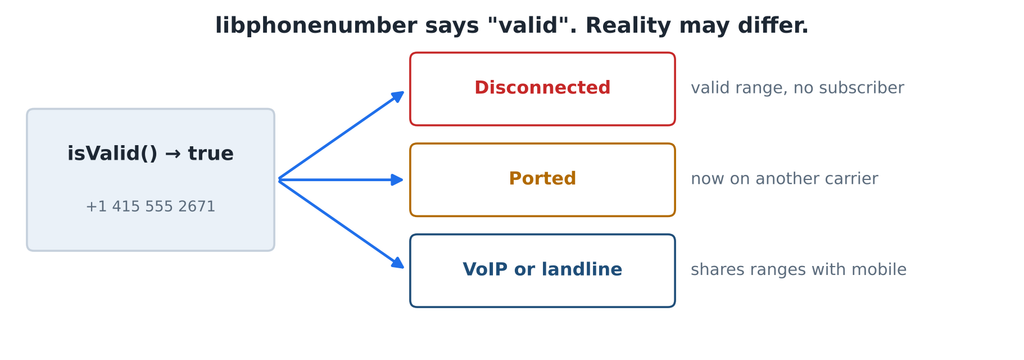
Valid by the numbering plan is not the same as live, current or mobile.
Every limit below comes from the same fact: the library’s metadata describes the numbering plan, not the network. It ships inside the package and changes only when you upgrade.
1. A valid number can be dead
The numbering plan says which ranges exist, not which numbers have a customer. In the US alone, the FCC estimated that about 35 million numbers are disconnected and reassigned every year. Every one of them still passes isValid().
2. A valid number can be ported
Number portability lets people keep their number when they switch carriers; in the US it has been mandatory for wireless numbers since 2003 (FCC). Google is explicit about the consequence: libphonenumber’s carrier mapper returns the carrier a range was originally assigned to, and Google states it does not provide data about the current carrier. The Python and PHP ports include that mapper; libphonenumber-js leaves it out.
3. A valid number can be VoIP or landline when you need mobile
In the North American plan, mobile, landline and VoIP numbers come from the same ranges. That is why the quick start returned FIXED_LINE_OR_MOBILE for a US number: the plan genuinely does not say which it is. For SMS verification or fraud screening, that is not enough: you need to know which it is.
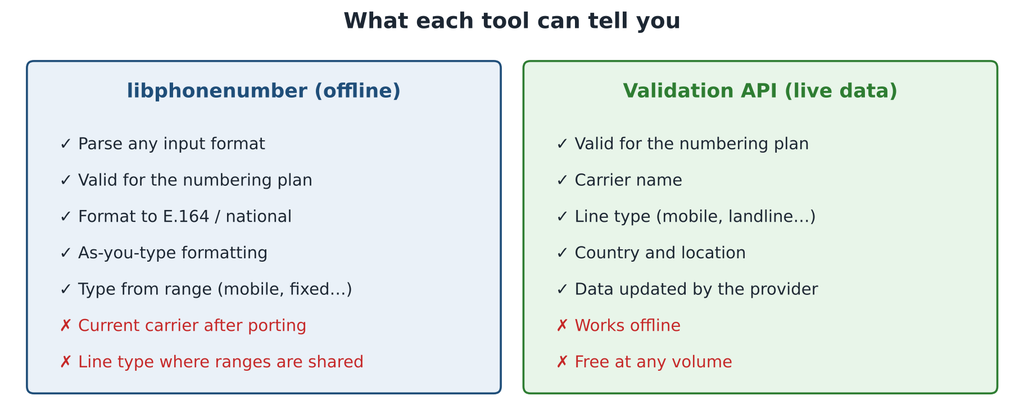
Two tools, two jobs.
Getting the actual carrier in JavaScript
To get carrier and line type, call a validation API from your server. This Express endpoint uses libphonenumber as a free gate first, so impossible numbers never cost an API call, then asks the API for the data the library cannot know. The key stays in .env.
.env (add to .gitignore)
NUMVERIFY_KEY=your_api_key_hereserver.js
// server.js: libphonenumber as the free gate, the API for carrier and line type.
// Run with: node --env-file=.env server.js (Node 20.6+; npm install express libphonenumber-js)
const express = require("express");
const { parsePhoneNumberFromString } = require("libphonenumber-js/max");
const app = express();
app.get("/api/carrier", async (req, res) => {
const phone = parsePhoneNumberFromString(String(req.query.number || ""), String(req.query.country || "US"));
// Gate: reject anything the numbering plan says cannot exist, at no API cost.
if (!phone || !phone.isValid()) {
return res.status(422).json({ valid: false, reason: "Not a valid number for its country" });
}
const params = new URLSearchParams({
access_key: process.env.NUMVERIFY_KEY,
number: phone.number.slice(1), // E.164 without the leading +
});
try {
const r = await fetch(`http://apilayer.net/api/validate?${params}`, { signal: AbortSignal.timeout(8000) });
const data = await r.json();
if (data.error) return res.status(502).json({ error: data.error.info || data.error.type });
res.json({
e164: phone.number,
country: phone.country,
libraryType: phone.getType() ?? null, // what the numbering plan says
valid: data.valid, // what the API says
carrier: data.carrier || null,
lineType: data.line_type || null,
});
} catch {
res.status(502).json({ error: "Carrier lookup unavailable" });
}
});
app.listen(3000, () => console.log("http://localhost:3000"));Run it with node –env-file=.env server.js (Node 20.6+) after npm install express libphonenumber-js:
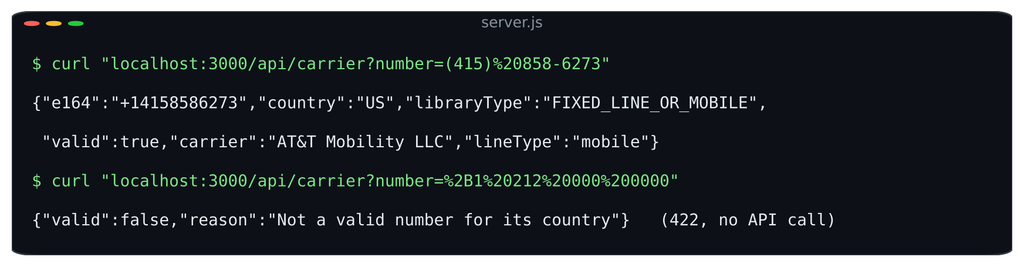
The gate rejects the impossible number before any API call (test run with sample data).
The response shows both views side by side: libraryType is what the numbering plan says (FIXED_LINE_OR_MOBILE), lineType is what the API reports (mobile). For more on what carrier data is and how to use it, see our carrier lookup page.
| The free Numverify plan serves the API over HTTP, so the key is not encrypted in transit. Use a plan with HTTPS for production. |
Using both together
The two tools are complementary, not competitors. A pattern that works for most apps:
- Format as the user types with AsYouType.
- Gate on the server with parsePhoneNumberFromString(…).isValid(). Reject anything that fails, at no cost.
- Store the E.164 value from phone.number.
- Call the API only for numbers that passed, and only where carrier or line type changes a decision: SMS verification, fraud checks, routing.
- Cache the API result with the stored number, so repeat checks are free.
For the browser side of this pattern, including a debounced check and error states, see validating phone numbers in JavaScript. If you need live status on top of carrier data, our explainer on HLR lookups covers that layer.
FAQs
What is libphonenumber?
libphonenumber is Google’s open-source library for parsing, formatting and validating international phone numbers. It checks numbers against each country’s numbering plan offline, and has popular ports for JavaScript, PHP and Python.
Can libphonenumber detect the carrier?
Only partly. The Java, PHP and Python versions include a carrier mapper that returns the carrier a number range was originally assigned to, where data exists. It does not reflect porting, so it cannot tell you the current carrier. libphonenumber-js does not include carrier data.
How accurate is libphonenumber?
It is very accurate at what it does: checking numbers against published numbering plans, which Google keeps updated. It cannot tell you whether a valid number is in service, ported or VoIP, because that information is not in the numbering plan.
What should I use alongside libphonenumber for live checks?
A phone validation API called from your server. Use libphonenumber as a free first gate, then the API for carrier and line type. For whether a mobile is currently reachable, use an HLR lookup.
| Fill the gap libphonenumber leaves. Create a free Numverify API key and add carrier and line type to the numbers your library already validates. Start with number validation in JavaScript. |