
| The most reliable regex for phone numbers is a permissive one: an optional plus sign followed by 7 to 15 digits with spaces, dashes, dots or brackets allowed. For stored numbers, use the E.164 pattern ^\+[1-9]\d{1,14}$. Regex can only check format; it cannot tell you whether a number exists, is active or is mobile. |
Table of Contents
Key Takeaways
- Use a permissive pattern for user input and the strict E.164 pattern for numbers you have already normalized and stored.
- Every pattern below was tested against the same pass and fail cases in JavaScript, Python and PHP.
- Strict, country-specific patterns break: they reject valid formats, miss numbering changes and lock out international users.
- No regex can tell you whether a number is allocated, active, ported, or mobile versus landline.
- The setup that survives is a permissive regex in the browser and a validation API on the server.
You came here for a phone number regex, so the patterns come first. Each one is in a code block you can copy, with a table of strings it matches and rejects. After that comes the part most regex answers leave out: where these patterns fail, and what to use alongside them.
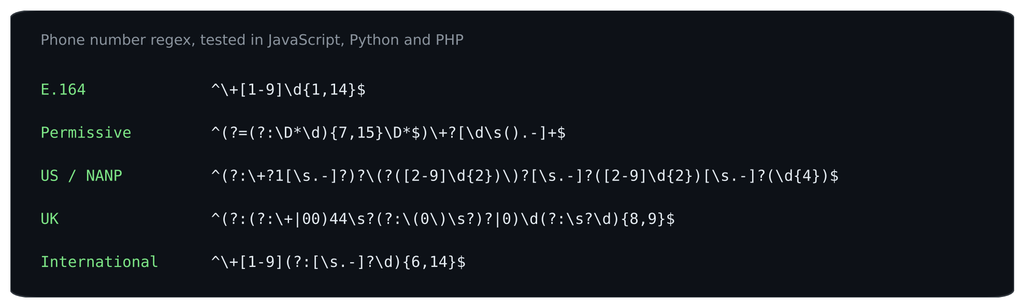
The five patterns in this post, each tested in JavaScript, Python and PHP.
The patterns you came for
1. Permissive (recommended for user input)
Regex
^(?=(?:\D*\d){7,15}\D*$)\+?[\d\s().-]+$An optional +, then digits, spaces, brackets, dots and dashes, with a lookahead that requires 7 to 15 digits in total (E.164’s maximum is 15). It accepts how people actually type numbers and rejects obvious junk.
| Input | Result |
|---|---|
| +1 (415) 555-2671 | Match |
| 020 7946 0958 | Match |
| +44 20 7946 0958 | Match |
| 415.555.2671 | Match |
| 12345 | No match |
| call me | No match |
| +1 415 555 2671 ext 2 | No match |
| 1234567890123456 | No match |
2. E.164 (for normalized, stored numbers)
Regex
^\+[1-9]\d{1,14}$E.164 is the ITU’s international numbering format (ITU-T E.164): a +, a country code that never starts with 0, and at most 15 digits, with no spaces. Use this pattern after you have normalized a number, not on raw user input. Our guide to E.164 covers the format in full.
| Input | Result |
|---|---|
| +14155552671 | Match |
| +442079460958 | Match |
| +49301234567 | Match |
| 14155552671 | No match |
| +1 415 555 2671 | No match |
| +04155552671 | No match |
| +1234567890123456 | No match |
3. US and Canada (NANP)
Regex
^(?:\+?1[\s.-]?)?\(?([2-9]\d{2})\)?[\s.-]?([2-9]\d{2})[\s.-]?(\d{4})$North American numbers have a 3-digit area code and a 3-digit exchange code, neither starting with 0 or 1 (NANPA), then 4 digits. This pattern allows an optional +1 or 1, brackets around the area code and common separators. The three capture groups give you area code, exchange and line number.
| Input | Result |
|---|---|
| (415) 555-2671 | Match |
| 415-555-2671 | Match |
| +1 415 555 2671 | Match |
| 1.415.555.2671 | Match |
| 4155552671 | Match |
| (015) 555-2671 | No match |
| 415-155-2671 | No match |
| 555-2671 | No match |
4. United Kingdom
Regex
^(?:(?:\+|00)44\s?(?:\(0\)\s?)?|0)\d(?:\s?\d){8,9}$UK numbers start with 0 domestically or +44 / 0044 internationally, followed by 9 or 10 more digits. The pattern also accepts the common +44 (0)20 style. Note that +44 020… is rejected: the leading 0 is dropped after the country code.
| Input | Result |
|---|---|
| 020 7946 0958 | Match |
| +44 20 7946 0958 | Match |
| +44 (0)20 7946 0958 | Match |
| 07700 900123 | Match |
| 0044 7700 900123 | Match |
| 01632 960001 | Match |
| 020 7946 09 | No match |
| +44 020 7946 0958 | No match |
5. International (with country code)
Regex
^\+[1-9](?:[\s.-]?\d){6,14}$A +, a country code digit from 1 to 9, then 6 to 14 more digits with optional single separators. It requires the country code, so it suits forms where you ask for international format.
| Input | Result |
|---|---|
| +1 415 555 2671 | Match |
| +44 20 7946 0958 | Match |
| +49 30 1234567 | Match |
| +81 3-1234-5678 | Match |
| +61 2 9876 5432 | Match |
| 020 7946 0958 | No match |
| +0 123 456 789 | No match |
| +1 23 | No match |
Using them in code (JavaScript shown; the same strings work in Python’s re and PHP’s preg_match with / delimiters):
JavaScript
const PHONE_PERMISSIVE = /^(?=(?:\D*\d){7,15}\D*$)\+?[\d\s().-]+$/;
const PHONE_E164 = /^\+[1-9]\d{1,14}$/;

PHONE_PERMISSIVE.test("+1 (415) 555-2671"); // true
PHONE_E164.test("+14155552671");          // true
PHONE_E164.test("+1 415 555 2671"); // false: spaces are not E.164Why every strict phone regex eventually breaks
Strict patterns encode assumptions about one country’s numbering at one point in time. Numbering plans change, people type numbers in many ways, and your users are rarely all in one country. Real, valid numbers that common strict patterns reject:
| Strict pattern | Valid number it rejects | Why |
|---|---|---|
| ^\d{3}-\d{3}-\d{4}$ | (415) 555-2671 | Brackets are a normal way to write a US area code |
| ^\d{3}-\d{3}-\d{4}$ | +44 20 7946 0958 | International users exist |
| ^07\d{9}$ (UK mobile) | +44 7700 900123 | Same number written with the country code |
| ^\+?\d{10,12}$ | +49 30 1234567 | German numbers vary in length |
| ^\d{10}$ | 415.555.2671 | Dots as separators |
Then there are changes over time. New area codes are added to the North American plan as existing ones run out. Countries reorganize their plans: Mexico, for example, moved to uniform 10-digit dialling in 2019, so patterns written for the old mobile prefixes stopped matching. And number portability means a number’s prefix no longer tells you its carrier or line type. A pattern you write today encodes rules that will change.
What regex can never tell you
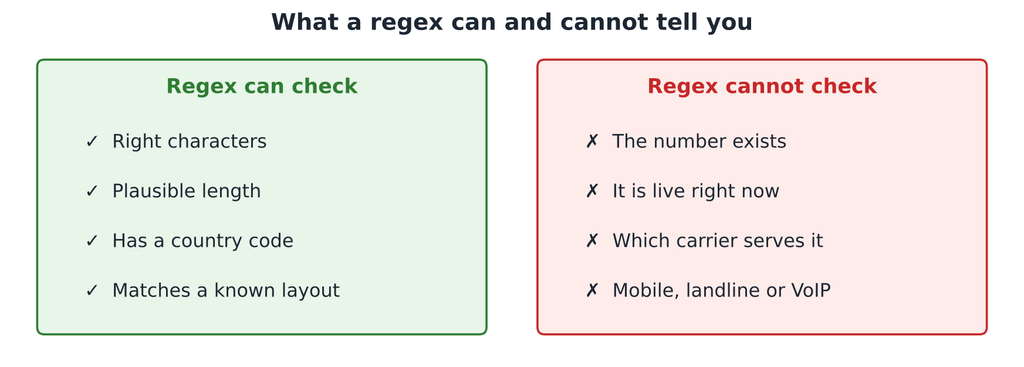
Format is the only thing a pattern can see.
Even a perfect pattern only sees characters. +44 7700 900123 passes every UK pattern above, but it sits in a range Ofcom reserves for TV and film, so no phone will ever answer it. A regex cannot tell you:
- Whether the number exists. Is that range allocated to an operator at all?
- Whether it is live. Allocated numbers are disconnected and reassigned all the time.
- Which carrier serves it. After porting, the prefix says nothing reliable about the network.
- Whether it is mobile, landline or VoIP. In the US, all three share the same area codes.
The sane setup: permissive regex, then an API
Use each tool for what it does well:
- In the browser: a permissive pattern for instant feedback on typos.
- On your server: normalize to E.164 and check the strict E.164 pattern.
- Then: call a validation API to confirm the number is valid and get its country, carrier and line type.
JavaScript (server)
const digits = input.replace(/\D/g, "");
const e164 = "+" + digits;            // assumes the user typed a country code
if (!/^\+[1-9]\d{1,14}$/.test(e164)) throw new Error("Not a valid international number");

// Format is fine. Now check reality with a validation API (full example in our JavaScript guide).Our post on validating phone numbers in JavaScript builds this whole setup end to end, with an Express endpoint and a debounced front end. For the API side, see number validation in JavaScript.
Test numbers for your pattern
Use this set to test any phone regex you write or inherit. The numbers use ranges reserved for fiction (Ofcom drama numbers and the US 555-01xx block) or obviously invalid values, so you can share them safely.
| Input | Should a permissive pattern accept it? | Notes |
|---|---|---|
| +1 (415) 555-2671 | Yes | Brackets, spaces and dash |
| 415.555.2671 | Yes | Dots |
| +44 20 7946 0958 | Yes | UK drama-range landline |
| +44 (0)20 7946 0958 | Yes | UK trunk zero in brackets |
| +49 30 1234567 | Yes | Shorter German number |
| +81 3-1234-5678 | Yes | Japan, dashes |
| 12345 | No | Too short |
| call me | No | Letters |
| 1234567890123456 | No | 16 digits, longer than E.164 allows |
| +1 415 555 2671 ext 2 | No | Extension: handle in a separate field |
Copy them into your test suite. If a strict pattern rejects any of the “Yes” rows, you have found the trap before your users do.
FAQs
What is the best regex for phone numbers?
For user input, a permissive pattern: an optional plus sign followed by 7 to 15 digits, allowing spaces, brackets, dots and dashes. For stored numbers, use the E.164 pattern ^\+[1-9]\d{1,14}$ after normalizing.
How do I validate international numbers with regex?
Require a plus sign and country code, then allow 7 to 15 digits in total, for example ^\+1-9{6,14}$. Regex cannot apply each country’s rules, so confirm the number with a validation API.
Can regex check if a number is real?
No. Regex only checks format. Whether a number is allocated, active, mobile or landline needs numbering-plan data or a validation API.
What regex matches E.164?
^\+[1-9]\d{1,14}$ matches E.164: a plus sign, a first digit from 1 to 9, and up to 15 digits in total with no spaces or punctuation.
| Go beyond format. Create a free Numverify API key and confirm the numbers your regex lets through are real. Start with number validation in JavaScript. |