

| PHP phone number validation has three levels. preg_match checks that the input looks like a phone number. The libphonenumber-for-php library checks a number against each country’s numbering rules and formats it. A validation API, called with cURL, confirms the number is valid and returns its carrier and line type. Most applications combine two or all three. |
Table of Contents
Key Takeaways
- PHP has no built-in phone validator; FILTER_VALIDATE_* has no phone filter. Use preg_match, a library or an API.
- preg_match is instant and dependency-free, but it only checks format.
- libphonenumber-for-php applies real numbering-plan rules per country, offline, and formats numbers to E.164. It cannot tell you whether a number is in service.
- A validation API adds live data: whether the number is valid, plus its country, carrier and line type, in one HTTP call.
- In Laravel, combine a regex rule with a custom rule class that calls the API, caches results and fails open if the API is unreachable.
PHP gives you three solid ways to validate a phone number, and each one answers a different question. This post walks through all three with complete PHP 8 code, then shows how to wire them into Laravel. If you only need a pattern, our post on the phone number regex trap has tested patterns for several countries.
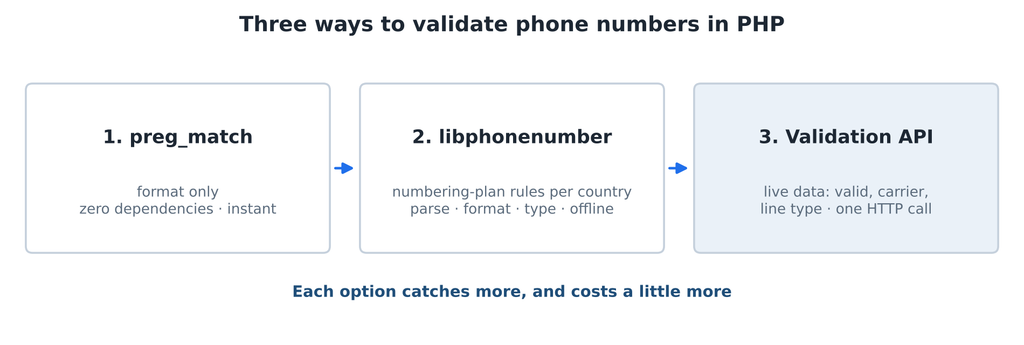
Three options, each catching more than the last.
Option 1: preg_match format checks
The fastest check is a regular expression. Two patterns cover most needs: a permissive one for raw input, and the strict E.164 pattern for numbers you have already cleaned.
PHP (regex.php)
<?php
// Format checks with preg_match. These catch typos, not fake numbers.

function isPlausiblePhone(string $input): bool
{
    // Permissive: optional +, then 7 to 15 digits with common separators.
    return preg_match('/^(?=(?:\D*\d){7,15}\D*$)\+?[\d\s().-]+$/', $input) === 1;
}

function isE164(string $input): bool
{
    // Strict E.164: +, country code not starting with 0, up to 15 digits total.
    return preg_match('/^\+[1-9]\d{1,14}$/', $input) === 1;
}

function toE164Candidate(string $input): string
{
    // Keep a leading + and the digits; drop spaces, dashes, dots and brackets.
    $digits = preg_replace('/\D/', '', $input);
    return str_starts_with(trim($input), '+') ? '+' . $digits : $digits;
}

foreach (['+1 (415) 555-2671', '020 7946 0958', '12345', 'call me', '+44 7700 900123'] as $n) {
    printf("%-20s plausible=%-5s e164=%s\n", $n,
        isPlausiblePhone($n) ? 'yes' : 'no',
        isE164(toE164Candidate($n)) ? 'yes' : 'no');
}
Run it with php regex.php:
Output
+1 (415) 555-2671    plausible=yes   e164=yes
020 7946 0958        plausible=yes   e164=no
12345                plausible=no    e164=no
call me              plausible=no    e164=no
+44 7700 900123 plausible=yes e164=yesNotice the second line: 020 7946 0958 is a plausible UK number but not E.164, because it has no country code. A regex cannot add one; you need to know the country. Notice the last line too: +44 7700 900123 passes both checks, yet it is in a range Ofcom reserves for TV drama and will never connect. That is the limit of format checks.
Option 2: libphonenumber for PHP
Google’s libphonenumber holds the numbering rules for every country: valid lengths, prefixes and number types. The giggsey/libphonenumber-for-php package is the widely used PHP port. Install it with Composer:
Shell
composer require giggsey/libphonenumber-for-phpPHP (libphonenumber.php)
<?php
// composer require giggsey/libphonenumber-for-php
require __DIR__ . '/vendor/autoload.php';
use libphonenumber\NumberParseException;
use libphonenumber\PhoneNumberFormat;
use libphonenumber\PhoneNumberType;
use libphonenumber\PhoneNumberUtil;
function parsePhone(string $input, string $defaultRegion = 'US'): ?array
{
$util = PhoneNumberUtil::getInstance();
try {
$number = $util->parse($input, $defaultRegion);
} catch (NumberParseException $e) {
return null; // not a phone number at all
}
// match() works with the enum used by v9 and the integer constants used by v8.
$type = match ($util->getNumberType($number)) {
PhoneNumberType::MOBILE => 'mobile',
PhoneNumberType::FIXED_LINE => 'landline',
PhoneNumberType::FIXED_LINE_OR_MOBILE => 'landline or mobile',
PhoneNumberType::TOLL_FREE => 'toll free',
PhoneNumberType::VOIP => 'voip',
default => 'other',
};
return [
'valid' => $util->isValidNumber($number), // matches the country's numbering plan
'e164' => $util->format($number, PhoneNumberFormat::E164),
'region' => $util->getRegionCodeForNumber($number),
'type' => $type,
];
}
foreach (['(415) 555-2671', '+44 20 7946 0958', '+44 7700 900123', '+1 212 000 0000'] as $n) {
echo str_pad($n, 18), json_encode(parsePhone($n)), PHP_EOL;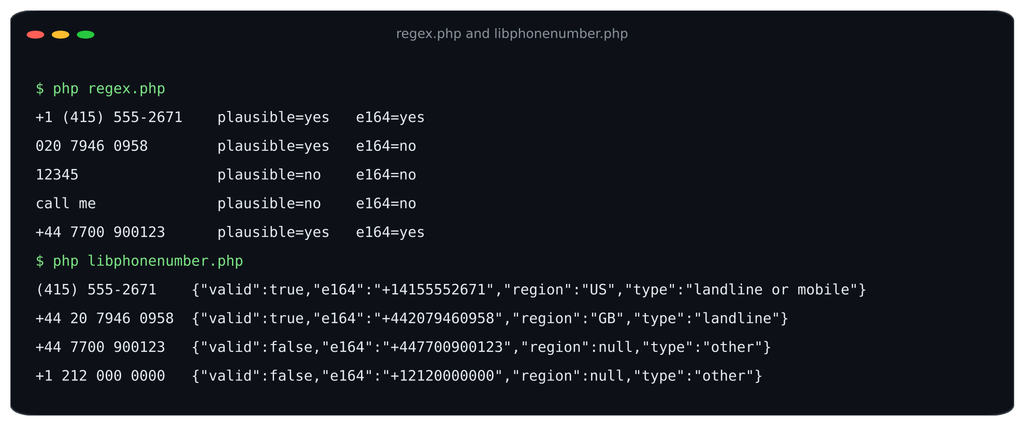
Both format-level options run side by side. libphonenumber rejects the drama-range number that regex accepted.
Two things stand out in that output. libphonenumber correctly rejects +44 7700 900123 (the drama range) and +1 212 000 0000 (US exchange codes cannot start with 0), which no simple regex catches. But it reports (415) 555-2671 as “landline or mobile”, because in the US both share the same ranges.
Be clear about what the library knows. It checks the published numbering plan, offline, using metadata bundled with the package. It does not know whether a number is assigned to a customer, whether it was ported, or which carrier serves it. Keep the package updated, because numbering plans change and the metadata ships with each release.
| Version note: from version 9, getNumberType() returns an enum rather than an integer. The match() expression above works with both, which is why it is used instead of an array lookup. |
Option 3: Live validation with the API
For data the numbering plan cannot provide, call a validation API. This function uses cURL, reads the key from the environment, handles network, HTTP and API errors separately, and returns a clean array.
PHP (numverify.php)
<?php
// Live validation with the Numverify API using cURL (PHP 8).
// Set the key in your environment: export NUMVERIFY_KEY=your_api_key_here

function validatePhone(string $number, string $countryCode = ''): array
{
    $key = getenv('NUMVERIFY_KEY');
    if ($key === false || $key === '') {
        throw new RuntimeException('NUMVERIFY_KEY is not set');
    }

    $query = http_build_query([
        'access_key'   => $key,
        'number'       => preg_replace('/\D/', '', $number),
        'country_code' => strtoupper($countryCode),
    ]);

    $ch = curl_init('http://apilayer.net/api/validate?' . $query);
    curl_setopt_array($ch, [
        CURLOPT_RETURNTRANSFER => true,
        CURLOPT_CONNECTTIMEOUT => 5,
        CURLOPT_TIMEOUT        => 10,
    ]);
    $body = curl_exec($ch);
    $status = curl_getinfo($ch, CURLINFO_RESPONSE_CODE);
    $curlError = curl_error($ch);
    curl_close($ch);

    if ($body === false) {
        throw new RuntimeException("Network error: $curlError");
    }
    if ($status >= 400) {
        throw new RuntimeException("HTTP $status from validation API");
    }

    $data = json_decode($body, true, flags: JSON_THROW_ON_ERROR);
    if (isset($data['error'])) { // API errors arrive in the JSON body
        throw new RuntimeException(sprintf('API error %d: %s',
            $data['error']['code'] ?? 0, $data['error']['info'] ?? $data['error']['type'] ?? 'unknown'));
    }

    return [
        'valid'     => (bool) $data['valid'],
        'e164'      => $data['international_format'] ?? null,
        'country'   => $data['country_code'] ?? null,
        'carrier'   => $data['carrier'] ?? null,
        'line_type' => $data['line_type'] ?? null,
        'location'  => $data['location'] ?? null,
    ];
}

if (PHP_SAPI === 'cli' && isset($argv[1])) {
    try {
        print_r(validatePhone($argv[1], $argv[2] ?? ''));
    } catch (RuntimeException $e) {
        fwrite(STDERR, $e->getMessage() . PHP_EOL);
        exit(1);
    }
}Run it from the command line:
| Shellexport NUMVERIFY_KEY=your_api_key_herephp numverify.php “+1 (415) 858-6273” US |
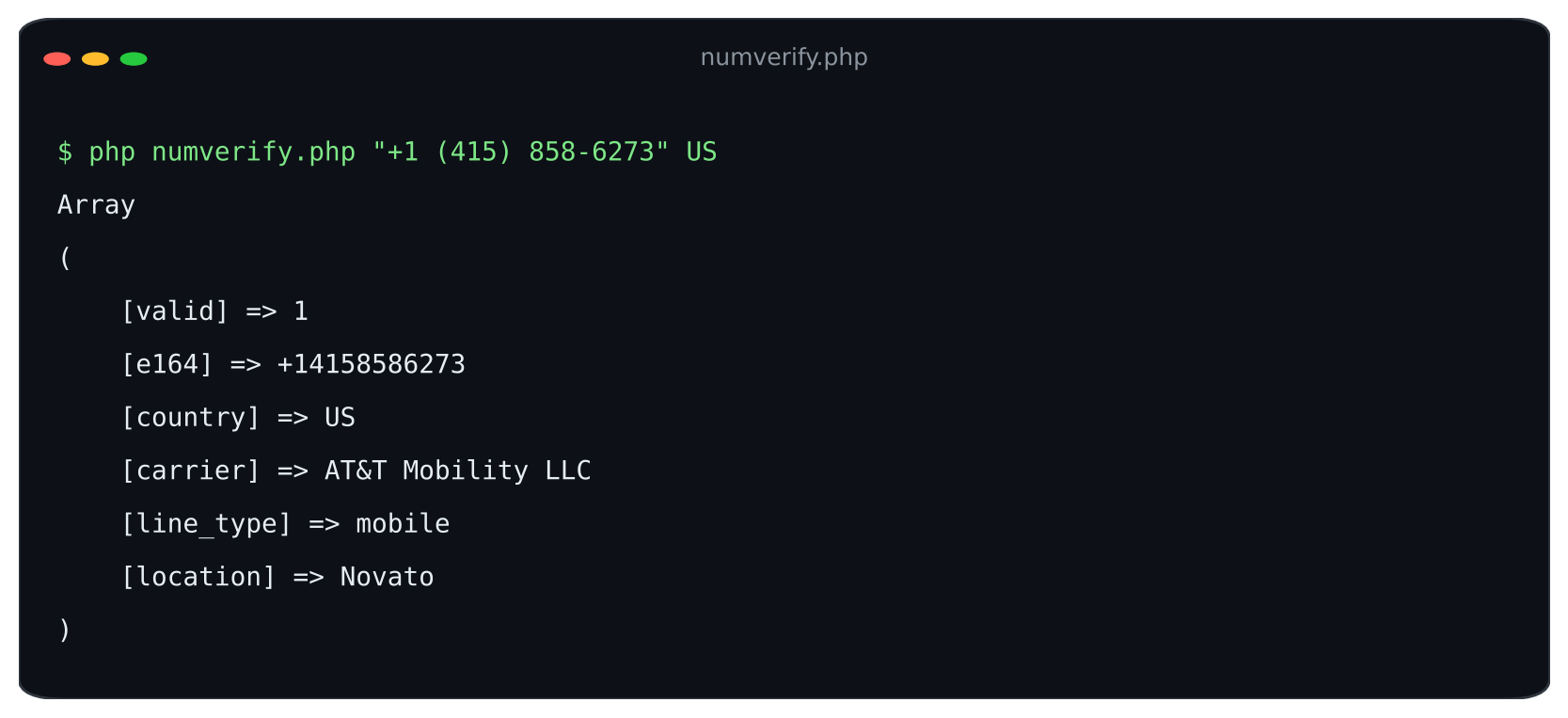
numverify.php output (test run against sample data).
The raw API response the function reads looks like this:
JSON response
{
  "valid": true,
  "number": "14158586273",
  "local_format": "4158586273",
  "international_format": "+14158586273",
  "country_prefix": "+1",
  "country_code": "US",
  "country_name": "United States of America",
  "location": "Novato",
  "carrier": "AT&T Mobility LLC",
  "line_type": "mobile"
}Error handling matters here, because the API reports problems such as an invalid key or a used-up quota inside the JSON body, as an error object with a code and message. The function turns those into exceptions instead of treating them as an invalid number.
| The free Numverify plan serves the API over HTTP, so the key is not encrypted in transit. Use a plan with HTTPS for production. |
Doing it in Laravel
Laravel phone number validation fits naturally into its validation rules. Use the built-in regex rule for the format check, and a custom rule class for the API check. First, add the key to your config:
config/services.php
// config/services.php
'numverify' => [
    'key' => env('NUMVERIFY_KEY'),
],.env
NUMVERIFY_KEY=your_api_key_hereThen create the rule with php artisan make:rule ValidPhoneNumber and replace its contents:
app/Rules/ValidPhoneNumber.php
<?php
// app/Rules/ValidPhoneNumber.php  (create with: php artisan make:rule ValidPhoneNumber)

namespace App\Rules;

use Closure;
use Illuminate\Contracts\Validation\ValidationRule;
use Illuminate\Http\Client\ConnectionException;
use Illuminate\Support\Facades\Cache;
use Illuminate\Support\Facades\Http;
use Illuminate\Support\Facades\Log;

class ValidPhoneNumber implements ValidationRule
{
    public function __construct(
        private string $countryCode = '',
        private array $allowedLineTypes = [], // e.g. ['mobile'] for SMS signups
    ) {}

    public function validate(string $attribute, mixed $value, Closure $fail): void
    {
        $number = preg_replace('/\D/', '', (string) $value);

        try {
            // Cache results for a day so retries and repeat submits don't use quota.
            $data = Cache::remember("numverify:{$number}:{$this->countryCode}", now()->addDay(), fn () =>
                Http::timeout(8)->get('http://apilayer.net/api/validate', [
                    'access_key'   => config('services.numverify.key'),
                    'number'       => $number,
                    'country_code' => $this->countryCode,
                ])->throw()->json()
            );
        } catch (ConnectionException|\Illuminate\Http\Client\RequestException $e) {
            Log::warning('Phone validation unavailable', ['error' => $e->getMessage()]);
            return; // fail open: don't block signups when the API is unreachable
        }

        if (isset($data['error'])) {
            Log::error('Numverify error', $data['error']);
            Cache::forget("numverify:{$number}:{$this->countryCode}");
            return;
        }

        if (empty($data['valid'])) {
            $fail('The :attribute is not a valid phone number.');
            return;
        }

        if ($this->allowedLineTypes && ! in_array($data['line_type'] ?? null, $this->allowedLineTypes, true)) {
            $fail('The :attribute must be a ' . implode(' or ', $this->allowedLineTypes) . ' number.');
        }
    }
}Use it in a controller or Form Request, after the cheap regex rule:
Controller or Form Request
use App\Rules\ValidPhoneNumber;

$validated = $request->validate([
    'phone' => [
        'bail',     // stop at the first failure, so junk never reaches the API
        'required',
        'string',
        'regex:/^(?=(?:\D*\d){7,15}\D*$)\+?[\d\s().-]+$/', // cheap format check first
        new ValidPhoneNumber(countryCode: 'US', allowedLineTypes: ['mobile']),
    ],
]);Design choices in the rule:
- `bail` first. Without it, Laravel runs every rule even after one fails, so junk input would still be sent to the API.
- Cached results. Each number is cached for a day, so a user who resubmits a form does not spend a second API call.
- Fail open. If the API is unreachable or returns an error, the rule logs it and lets the value through, so an outage never blocks signups. Queue a re-check if you need certainty.
- Line type restriction. allowedLineTypes: [‘mobile’] rejects landlines and other types for flows that send SMS.
- Array syntax for the regex rule. Laravel requires the array form when a regex contains a pipe or other special characters, and it keeps the pattern readable.
Which option for which job
| Job | Recommended | Why |
|---|---|---|
| Contact form | preg_match | Catches typos; a wrong number costs little |
| International signup form | libphonenumber | Applies each country’s rules and normalizes to E.164 offline |
| Signup with SMS verification | Regex + API (mobile only) | Confirms the number is valid and can receive SMS |
| CRM or list import | libphonenumber, then API in batches | Normalize and dedupe offline, then validate what is left |
| Fraud-sensitive checkout | API with line type and carrier | Adds data the numbering plan cannot provide |
Using a framework or platform other than Laravel? See the Numverify integrations for ready-made connectors.
FAQs
How do I validate a phone number in PHP?
Use preg_match for a quick format check, the libphonenumber-for-php library to apply each country’s numbering rules, or a validation API called with cURL to confirm the number is valid and get its carrier and line type.
Does PHP have built-in phone validation?
No. PHP’s filter_var has filters for emails, URLs and IP addresses, but none for phone numbers. Use a regex, the libphonenumber-for-php library or an API.
How do I validate phone numbers in Laravel?
Combine Laravel’s regex rule for format with a custom rule class that calls a phone validation API. Create the class with php artisan make:rule, call the API inside validate(), and add it to your validation array.
What does the carrier field mean in the response?
It is the name of the mobile or telephone operator associated with the number, such as AT&T Mobility LLC. For ported numbers it may reflect the operator the number range was originally assigned to.
| Add live validation to your PHP app. Create a free Numverify API key, set it as NUMVERIFY_KEY, and run the cURL example above. Learn more at numverify.com. |