
| Phone number validation in JavaScript works best in two layers. In the browser, a permissive regex on an input of type “tel” catches typos instantly. On your server, a validation API confirms the number is real and returns its country, carrier and line type. Regex alone cannot tell a real number from a well-formatted fake one. |
Table of Contents
Key Takeaways
- Use regex for format and an API for reality. They answer different questions, so you need both.
- Keep the browser pattern permissive. Strict patterns reject real numbers from other countries and anyone who types spaces or brackets.
- Call the validation API from your server with the key in an environment variable. A key in front-end code is public.
- Debounce the check so the API runs once when the user pauses, not on every keystroke.
- Store the number in E.164 format along with the line type, so later SMS and fraud decisions do not need a second lookup.
Every developer who adds a phone field hits the same question: is a regex enough, or do I need an API? The short answer is that they do different jobs. This post shows the pattern that settles it, with complete code for each layer: an HTML input, a small Express endpoint and a debounced front-end check. If you want the background first, our JavaScript number validation overview covers the API itself.
The two layers of phone validation
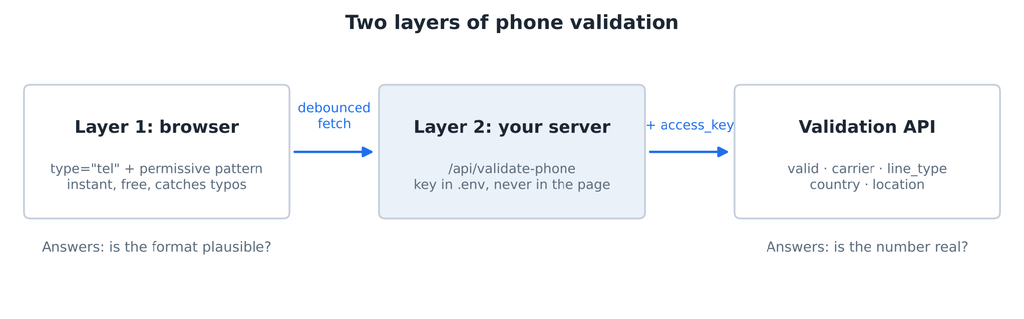
Format in the browser, reality on the server.
| Layer 1: browser format check | Layer 2: server API check | |
|---|---|---|
| Question | Does this look like a phone number? | Does this number actually exist? |
| Speed | Instant, every keystroke | One request after the user pauses |
| Cost | Free | One API call per check |
| Catches | Letters, missing digits, obvious typos | Unallocated numbers, wrong country, landlines when you need mobiles |
| Misses | Well-formatted fake numbers | Nothing it is asked about, within the data the provider has |
| Can be bypassed? | Yes, by anyone with dev tools | No, it runs on your server |
That last row matters. Browser checks are for user experience. Anything you rely on has to be checked again on the server.
Layer 1: Instant feedback in the browser
Start with the right input. type=”tel” brings up the phone keypad on mobile devices, autocomplete=”tel” lets browsers fill the user’s number, and the pattern attribute adds a built-in format check. Our guide to HTML phone inputs covers the attributes in more depth.
public/index.html
<!DOCTYPE html>
<html lang="en">
<head>
  <meta charset="UTF-8">
  <meta name="viewport" content="width=device-width, initial-scale=1.0">
  <title>Phone Validation</title>
  <style>
    body { font-family: system-ui, sans-serif; background: #f4f6f9; color: #1d2733; margin: 0; }
    form { max-width: 420px; margin: 48px auto; background: #fff; padding: 24px; border-radius: 12px; box-shadow: 0 2px 8px rgba(0,0,0,.08); }
    label { display: block; font-weight: 600; margin-bottom: 6px; }
    input { width: 100%; box-sizing: border-box; padding: 10px 12px; font: inherit; border: 1px solid #c5d0dc; border-radius: 8px; }
    input:user-invalid { border-color: #c62828; }
    #phone-status { min-height: 1.4em; margin: 8px 0 16px; font-size: .9rem; color: #5b6b7c; }
    #phone-status.ok { color: #2e7d32; }
    #phone-status.bad { color: #c62828; }
    button { padding: 10px 18px; border: none; border-radius: 8px; background: #1f6feb; color: #fff; font: inherit; }
    button:disabled { background: #9db9d6; }
  </style>
</head>
<body>
  <form id="signup" novalidate>
    <label for="phone">Phone number</label>
    <input id="phone" name="phone" type="tel" autocomplete="tel" inputmode="tel"
           placeholder="+1 415 555 2671" required
           pattern="\+?[0-9\s\(\)\.\-]{7,20}"
           title="Digits, spaces, brackets, dots and dashes; start with + for international numbers">
    <p id="phone-status" aria-live="polite"></p>
    <button type="submit" id="submit" disabled>Create account</button>
  </form>
  <script src="validate.js"></script>
</body>
</html>
The pattern \+?[0-9\s\(\)\.\-]{7,20} is deliberately loose: an optional plus sign, then 7 to 20 digits, spaces, brackets, dots or dashes. It accepts +1 (415) 555-2671, 020 7946 0958 and +49 30 1234567, and rejects call me or 12345.
Two details save debugging time. The pattern attribute is matched against the whole value, so no ^ or $ is needed. And modern browsers compile it with the regex v flag (MDN), which is why brackets, dots and dashes inside the character class are escaped. An unescaped ( there makes the pattern invalid and the browser silently ignores it.
Why not a strict pattern like ^\d{3}-\d{3}-\d{4}$? Because it rejects international users, anyone who types spaces, and real numbers in formats you did not anticipate. Our post on the phone number regex trap shows exactly where strict patterns break.
Layer 2: Real validation on your server
The server endpoint receives the number, strips formatting, calls the validation API with the key from an environment variable, and returns only the fields the browser needs. Install Express (npm install express) and create these files:
.env (add to .gitignore)
NUMVERIFY_KEY=your_api_key_hereserver.js
// server.js: validates numbers server-side so the API key never reaches the browser.
const express = require("express");
const app = express();
app.use(express.static("public"));
app.get("/api/validate-phone", async (req, res) => {
const number = String(req.query.number || "").replace(/\D/g, "").slice(0, 15);
const country = String(req.query.country || "").toUpperCase().slice(0, 2);
if (number.length < 7) return res.status(400).json({ error: "Number too short" });
const params = new URLSearchParams({ access_key: process.env.NUMVERIFY_KEY, number, country_code: country });
try {
const r = await fetch(`http://apilayer.net/api/validate?${params}`, { signal: AbortSignal.timeout(8000) });
const data = await r.json();
if (data.error) return res.status(502).json({ error: data.error.info || data.error.type });
const { valid, international_format, country_code, carrier, line_type, location } = data;
res.json({ valid, international_format, country_code, carrier, line_type, location });
} catch {
res.status(502).json({ error: "Validation service unavailable" });
}
});
app.listen(3000, () => console.log("http://localhost:3000"));Start it with node –env-file=.env server.js (Node 20.6 or newer) and open http://localhost:3000. What the endpoint does:
- Strips everything except digits and caps the length, so the API never receives junk.
- Rejects input under 7 digits without spending an API call.
- Passes country_code when the browser sends one, which lets users type local numbers.
- Returns a trimmed object, not the raw API response, and never echoes the key.
- Times out after 8 seconds and turns any failure into a clear 502 error.
The free Numverify plan serves the API over HTTP, so the key travels unencrypted between your server and the API. Paid plans support HTTPS; use them for production traffic.
Wiring the two together
The front-end script runs the browser check on every keystroke, waits for a 500 ms pause, then asks your endpoint. If the user keeps typing, the previous request is cancelled with an AbortController, so a slow response can never overwrite a newer one.
public/validate.js
const input = document.getElementById("phone");
const statusEl = document.getElementById("phone-status");
const submit = document.getElementById("submit");
let timer;
let controller;

function show(message, state = "") {
  statusEl.textContent = message;
  statusEl.className = state;
  submit.disabled = state !== "ok";
}

async function checkNumber(number) {
  controller?.abort(); // cancel the previous request if the user kept typing
  controller = new AbortController();
  show("Checking…");
  try {
    const res = await fetch(`/api/validate-phone?number=${encodeURIComponent(number)}`, { signal: controller.signal });
    const data = await res.json();
    if (!res.ok) return show(data.error || "Could not check this number.", "bad");
    if (!data.valid) return show("That doesn't look like a valid number. Please check it.", "bad");
    show(`✓ ${data.international_format} · ${data.line_type || "unknown line type"}`, "ok");
  } catch (err) {
    if (err.name !== "AbortError") show("Could not check this number. Try again.", "bad");
  }
}

input.addEventListener("input", () => {
  clearTimeout(timer);
  const value = input.value.trim();
  if (value.length < 7) return show(""); // too short to judge: stay quiet while typing
  if (!input.checkValidity()) return show("Use digits, spaces, brackets or dashes, and + for country codes.", "bad");
  timer = setTimeout(() => checkNumber(value), 500); // debounce: wait for a pause in typing
});
The submit button stays disabled until the server confirms the number. Here is what the user sees in each state:
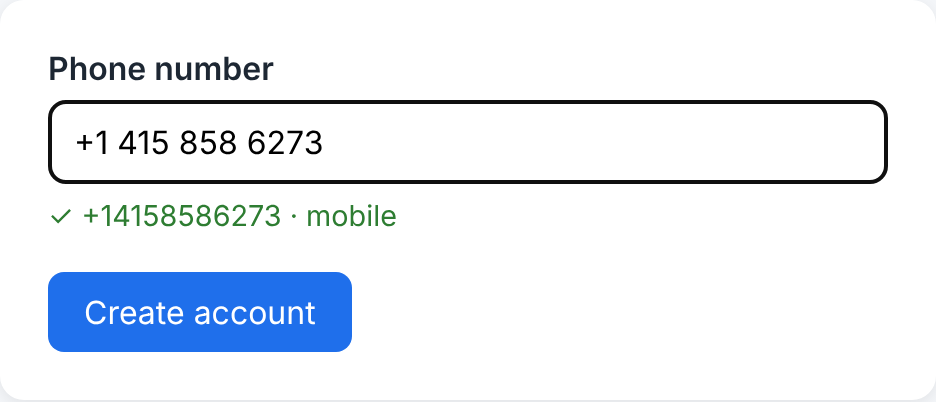
A valid number: formatted, typed as mobile, and the button unlocks.
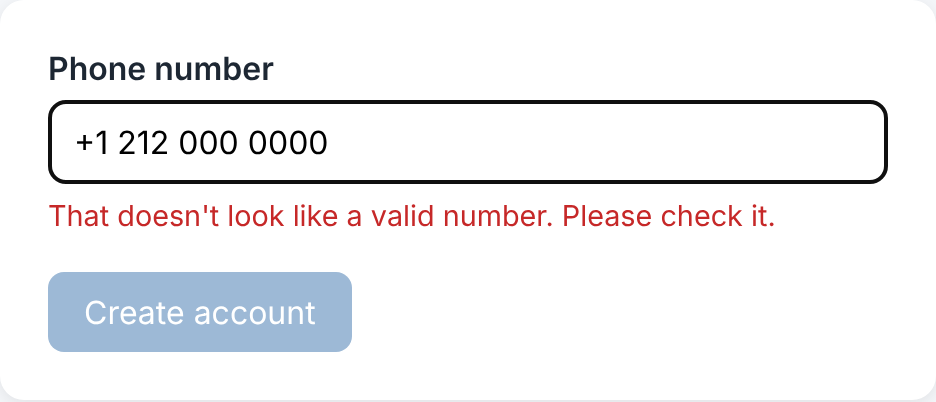
A well-formatted number that fails the API check.
In testing, typing a full 15-character number produced exactly one API call. Your server should still re-check the number when the form is submitted, because a determined user can bypass any browser script.
Reading the response
A successful API call returns JSON like this:
JSON response
{
  "valid": true,
  "number": "14158586273",
  "local_format": "4158586273",
  "international_format": "+14158586273",
  "country_prefix": "+1",
  "country_code": "US",
  "country_name": "United States of America",
  "location": "Novato",
  "carrier": "AT&T Mobility LLC",
  "line_type": "mobile"
}
| Field | Act on it | Store it |
|---|---|---|
| valid | Block or allow the form | No, it is implied by saving |
| international_format | Show it back to the user to confirm | Yes, as your canonical E.164 value |
| country_code | Flag a mismatch with the billing country | Yes |
| line_type | Require mobile for SMS verification | Yes, for routing SMS vs voice later |
| carrier | Optional input to fraud scoring | Optional; carriers change after porting |
| location | Rarely | Usually not needed |
Storing the E.164 value means every later system, from your SMS provider to your CRM, receives the number in the same format.
Edge cases that bite in production
- International users. A local number like 020 7946 0958 is ambiguous without a country. Either ask for the country in a separate field and send it as country_code, or ask users to include the + prefix.
- Pasted formatting. People paste numbers with non-breaking spaces, en dashes or “Tel:” prefixes. The server strips everything except digits, so these still validate.
- Extensions. +1 415 555 2671 ext 2 fails the pattern by design. If you need extensions, give them their own field.
- VoIP signups. Disposable VoIP numbers are a common route for fake accounts. If you require a mobile number for SMS verification, reject other line types on the server, not just in the browser.
- API downtime. Decide in advance whether to fail open (accept the number and re-check later) or fail closed (block the form). Most signup flows fail open and queue a re-check.
- Rate limiting your endpoint. Your /api/validate-phone route spends your quota. Add rate limiting per IP so nobody can drain it.
FAQs
How do I validate a phone number in JavaScript?
Check the format in the browser with an input of type tel and a permissive pattern, then send the number to your own server, which calls a phone validation API. The API confirms the number is valid and returns its country, carrier and line type.
Can JavaScript check if a number is real?
Not on its own. JavaScript and regex can only check format. To know whether a number is valid in its country’s numbering plan, and what type of line it is, you need a validation API or carrier data.
Should validation happen client-side or server-side?
Both. Client-side checks give instant feedback and catch typos. Server-side checks are the ones you can trust, because browser code can be bypassed, and they keep your API key private.
Why should the API key never be in front-end code?
Anything sent to the browser can be read by anyone through the page source or network tab. A leaked key lets others use your quota. Keep the key in a server environment variable and call the API from your server.
| Add real validation to your form. Create a free Numverify API key, drop it into your .env, and run the server above. See more in number validation in JavaScript. |